


ChatGPT business hub spotted showing daily mentions and clicks
OpenAI appears to be close to launching a "Claim your business in ChatGPT" hub that shows verified businesses how often ChatGPT mentions them and how many clicks those mentions send to their website. OpenAI has not announced it. What is known comes from screenshots posted on LinkedIn on 6 November by Juozas Kaziukėnas, who saw a launch-style banner for the feature that day and says he first saw early pieces of it in August.
Every detail below is unconfirmed until OpenAI publishes something. Even so, if it launches as described, it would be the first count of ChatGPT mentions and clicks in unpaid answers that OpenAI offers to businesses generally. Until now, only a small group of publishing partners is known to have had impression and click reports from OpenAI for unpaid answers. Businesses outside that group have relied on outside tools running sample prompts, or on ChatGPT referral traffic in GA4.
Claim your business in ChatGPT counts mentions and link clicks
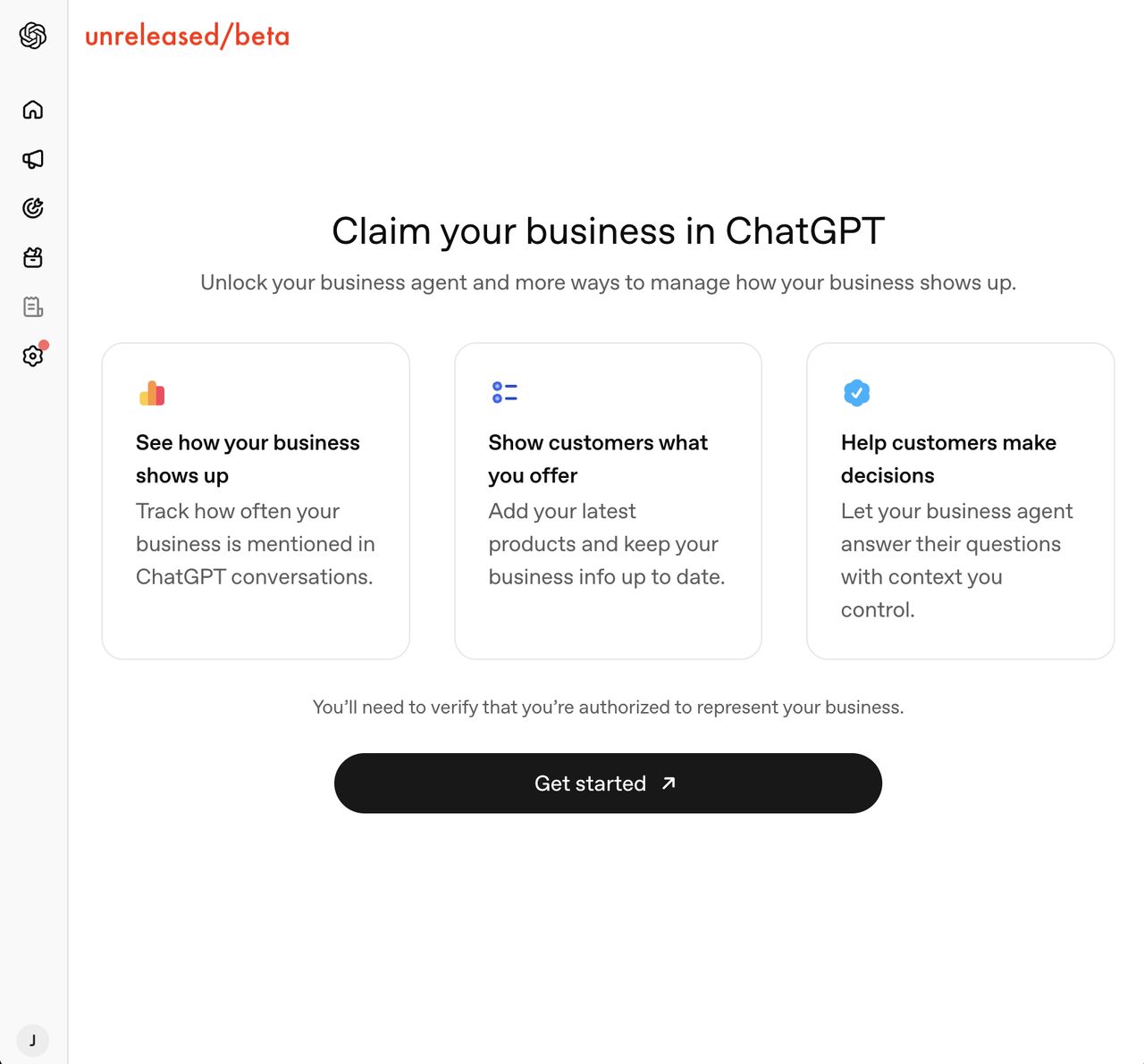
The screenshots list three things a business can do in the hub. It can see how it shows up, by tracking how often ChatGPT mentions it in conversations. It can add its latest products and keep its business information current. And it can let a "business agent" answer customer questions using context the business controls.
Kaziukėnas describes the analytics part as counting two events: how often the business turns up in ChatGPT answers, and how many times people click a link through to its website. Both are tracked daily and shown as a chart. The resemblance to Search Console's impressions and clicks is obvious, although nobody outside OpenAI knows yet how a mention is counted or whether a business named without a link registers as an impression.
Access is limited to businesses that have verified ownership. The example given is connecting a Shopify store. OpenAI's help centre already lists Shopify among the search providers ChatGPT search may send rewritten queries to, so the link between the two is not new. Whether a service business without an online store can verify some other way is not shown in the screenshots.
Businesses see mention counts without the prompts that triggered them
According to the post, the hub does not show prompt data, user data, competitor benchmarks or any kind of ranking. It will tell you that mentions rose or fell on a given day. It will not tell you which questions triggered them or who else was named in the same answer.
Kaziukėnas's own reading is that the chart cannot explain why the numbers move, but paired with external tools that track prompts it gives "accurate first-party data" on whether GEO or AEO work is paying off. For an Australian business that is the real change. The only first-party ChatGPT signal most businesses have so far is the referral line in GA4, and that line can drop sharply when a tracking tag goes missing, as it did from 8 to 16 October when ChatGPT's inline links lost their utm_source tag.
The feature also appears to be separate from ChatGPT ads and aimed at organic responses, which matters for anyone weighing paid placement after seeing what ChatGPT ad visits returned next to paid search.
OAI-SearchBot access decides whether ChatGPT search can cite you
Nothing can be claimed yet. The structure of the hub still tells you what OpenAI expects a business to have ready: a verifiable ownership link, accurate product and business details, and a website that ChatGPT can reach and cite in the first place.
The last item is the easiest to get wrong without noticing. Whether ChatGPT search can show your site depends on OAI-SearchBot, and OpenAI's crawler documentation says a site that blocks OAI-SearchBot is left out of ChatGPT search answers, although it can still turn up as a navigational link. The click count will stay low if your site is shut out of ChatGPT search answers.
Allow OAI-SearchBot even when you block GPTBot
OpenAI treats GPTBot and OAI-SearchBot as independent robots.txt settings. GPTBot collects content that may be used to train its models. OAI-SearchBot surfaces sites in ChatGPT search. ChatGPT-User fetches a page when a person asks for it, and OpenAI says robots.txt rules may not apply to it. You can block GPTBot and keep OAI-SearchBot allowed, and OpenAI says a robots.txt change takes about 24 hours to flow through to search.
Many sites have not kept the two apart. A Trakis study of 13,938 sites whose robots.txt could be read, last updated on 4 November, found that of the 1,331 sites blocking GPTBot by name, 17.1% also block OAI-SearchBot. Split the group and the picture sharpens. Sites using Cloudflare's managed robots.txt, which names only training bots, block OAI-SearchBot 0.3% of the time. Sites that wrote their own rules block it 31.3% of the time and block ChatGPT-User 47% of the time.
Across the whole sample, 11.4% of sites block GPTBot from the entire site and 3.5% block OAI-SearchBot. The files are Common Crawl's September 2026 copies rather than live fetches, and Trakis notes that a robots.txt only asks; a firewall or CDN rule can block a bot the file allows. OpenAI's help centre makes the same point from the other side. To be eligible for ChatGPT search, allow OAI-SearchBot and confirm your host or CDN accepts traffic from its published IP ranges. Placement is still not guaranteed.
Site owners should check robots.txt and their business details
Open your site's robots.txt and look for OAI-SearchBot by name. If GPTBot is blocked and OAI-SearchBot is not mentioned, check whether a User-agent: * rule catches it.
Ask whoever manages your CDN or firewall whether OpenAI's published searchbot IP ranges are allowed. Trakis notes that Cloudflare's edge AI bot settings never show up in the robots.txt file.
Decide deliberately on GPTBot. Blocking training is a legitimate choice; it just should not take your search visibility with it.
Make sure your business name, address, hours and product data match across your website, your ecommerce store and your Google Business Profile, since the hub's "keep your business info up to date" feature suggests ChatGPT will draw on what you submit.
Record your current ChatGPT referral sessions in GA4 so you have a baseline to compare with the hub's click count once it appears.
How ChatGPT chooses which pages to cite is covered in our guide to how ChatGPT search works, and the guide to what an LLM citation is explains why a mention and a link are different things. If the hub launches as the screenshots describe, those two mechanics are what its chart will be counting.